Client Overview
Industry: Finance
Company Size: 50-100 Employees
Main Offer/Product: Finance Advisory Services
Initial Situation & Challenges
Starting point: Advisors were completing calls as needed with their clients, after these calls they would have to document the meetings in the selected CRM. This documentation process was taking up a lot of time for the advisors and proving to be a challenge towards reaching their productivity goals. To add on top of that, the company was hiring extra people so they can draft ROAs (Record of Advice) and SOA (Statement of Advice), to lower the workload of the advisors on such tasks.
Key Pain Points:
To lower the workload of the advisors, the company had to go through processes of recruitment, training, and managing employees hired for drafting ROAs and SOAs, leading to extra costs and increasing the workload of the managers / staff responsible for training.
Documenting the meeting took extra time and needed to be really thorough so the extra staff that would be working on the ROAs and SOAs had everything that they needed. This resulted in extra workload on the advisors and extra costs for the company.
Our Approach & Actions Taken
Analysis & Insights:
We asked to be provided with example file notes (internal documentation files), ROAs and SOAs, and also the templates for these documents (including more than 10 different ROA templates).
After going through the material and complexity of these documents, we requested to be a part of a training session for the new employees that would be handling the drafting of ROAs and SOAs, so we can completely understand the relevant information to be taken into consideration for the creation of ROAs and SOAS. Our partner provided us with training recordings of previous team members that contained all the desired points we mentioned.
Finally, we requested the recordings of Advisory Meetings and the relevant file notes and ROAs, to fully grasp the relationship between the inputs from the meeting and the outputs that our partner expected.
Requirements and Expectations:
After consultations, the decision was made to completely automate this process, with the workflow starting exactly after the Advisory call is ended.
Before fully automating it, the Braynex Team suggested to build a UI app which would enable the staff to use the tool for an extended period of time on production, to highlight any edge cases that might come up.
The process should include automatic email sending of the ROA to the client. This requirement was to be added after the solution completed the UI integration phase.
How did we go about this solution (Architecture & Insights):
From the training session it was clear that the first step before drafting an ROA/SOA was always having the file note ready (which would be completed by the advisor), so we as well decided to base the ROA/SOA creation on the file note itself rather than the transcript of the meeting. So it was clear that our starting point was creating a file note from the transcript of the call, and then using that file note to create the ROA/SOA.
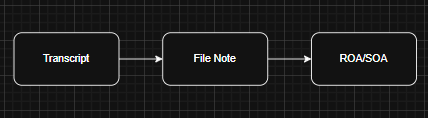
- Generating a file note from the transcript
The most important points to take into consideration here were making sure that no information is missed; the generated documents are consistent and reliable; and that no hallucinations occur. To address these issues, we decided to avoid extraction tasks: where we prompt an agent to extract information from a chunk of text; and rather go with a summarize logic.
After chunking the transcript into smaller pieces of text, with overlay logic applied, we set in place the “Classification Agent” (This was in fact a wrapper/instance, but we called them agents to make them more recognizable AI objects).
But what was the Classification Agent going to classify? – we were going to build the AI system architecture around the file notes template, reason being that the file note had only one default template, and since we needed to revolve around business needs, we decided to have that as our starting point by treating each section on this file note as a property in our AI system, by creating relevant agents per each section.
So the classification agent goes over a chunk of text from the transcript and decides the best matching section of the file note for that discussion, from a 14 options pool (by default, almost each of the sections were discussed about in an advisory meeting).
After the entire chunks of the transcript have been classified and grouped to the correct section agent,each section agent was triggered with a summarization task, taking as input all the chunks classified per that section and outputting a detailed summarization of those chunks.
In the end, the file note was created by putting together all the non-empty sections by code (no AI featured for higher consistency and reliability).
We did add an extra “Section Agent” called “GeneralPurposeAgent” which didn’t exist on the actual file note template. We added this agent to catch any edge cases that might not exactly fall under any section, though these cases were quite rare.
2. Generating ROAs/SOAs from the file note
This feature was easy to implement after achieving the consistent, reliable file notes from the transcript, since the ROAs and SOAs were generated by an agent which would take as an input the file note itself rather than the transcript. There were over 7 templates for these documents, and the result of this implementation was also consistent, reliable documents.
Solution Details:
Tools/Tech Used:
- Azure OpenAI Service
- LangChain
- Python, SQL, React + Vite
- Azure Graph API
Unique Adjustments for the Client:
- Added a simple CRM feature within the app for the testing phase
Key Takeaways:
Working with Azure OpenAI Service and having 14+ agents made possible really fast processing of the transcripts, by utilizing parallelization, we were able to trigger all of the agents at the same time and achieve fast results.
What worked really well was shaping the architecture of the summarization/section agents based on the file note template. This part of the architecture holds the responsibility of communicating all the needed information from the transcript to the documents, so falling short on the results here was going to affect the entire process. We have to add though that this architecture was possible because of the clearly defined sections of the file note template that were very distinct and unique from one another.